안녕하세요, 모든정보 블로그입니다.
솔직히 말할게요. 플러터 설치하다가 노트북 던질 뻔했습니다.
"구글이 만든 거니까 쉽겠지~" 했는데, 빨간 글씨 폭탄에 멘탈 터지고, 구글링 3시간 해도 해결 안 되고. 결국 AI한테 SOS 쳤습니다.
그래서 준비했습니다. 제가 삽질한 3시간을 여러분은 10분 만에 끝내세요.
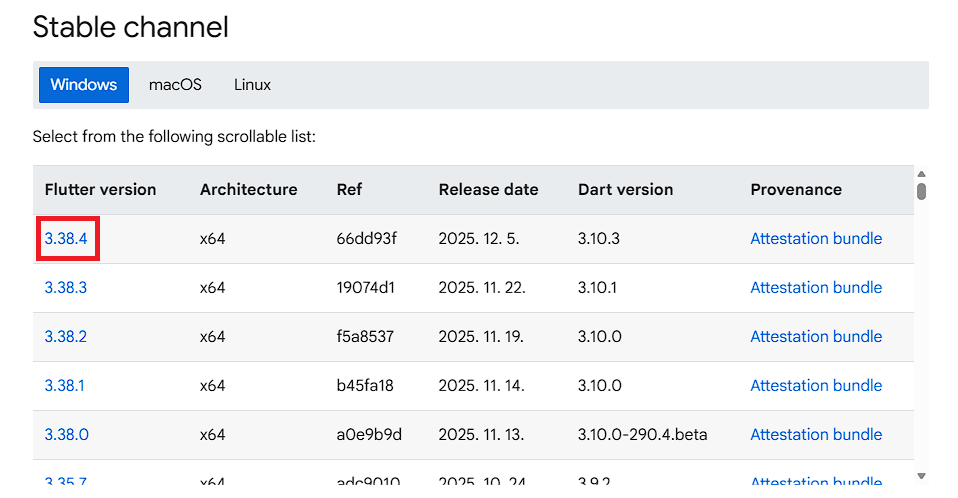
flutter 설치 경로
🔥 오류 1. "flutter은(는) 내부 또는 외부 명령... 아닙니다"
빡침 지수: ★★★★☆
cmd 창에 flutter doctor 딱 쳤는데요.

'flutter'은(는) 내부 또는 외부 명령, 실행할 수 있는 프로그램, 또는
배치 파일이 아닙니다.
아니 방금 설치했잖아. 왜 못 찾아?
✅ 원인: 컴퓨터가 플러터 위치를 모름
플러터를 깔아놓고 "어디 있는지" 안 알려줘서 그렇습니다.
✅ 해결 (1분 컷)
윈도우 검색 → "환경 변수" 입력
시스템 환경 변수 편집 클릭
[환경 변수] → 시스템 변수에서 Path 더블클릭
[새로 만들기] → C:\src\flutter\bin 입력 (본인 설치 경로로!)(맨 위로 올려주세요! 안하면 나중에 경로오류남)
⚠ 중요: CMD 껐다가 다시 켜기 ← 이거 안 해서 30분 날림
🔥 오류 2. "[X] Android toolchain" 빨간불
빡침 지수: ★★★★★
첫 번째 고비 넘겼더니 또 빨간색입니다.
[X] Android toolchain - develop for Android devices
X Unable to locate Android SDK.
안드로이드 스튜디오 분명 깔았는데?!
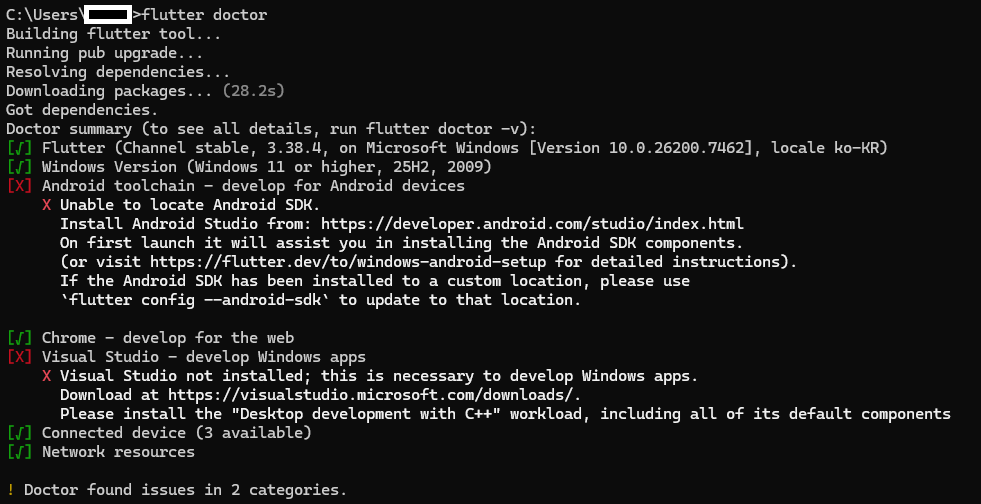
✅ 원인: 숨겨진 도구를 안 깔아서
설치할 때 자동으로 안 깔리는 게 있습니다.
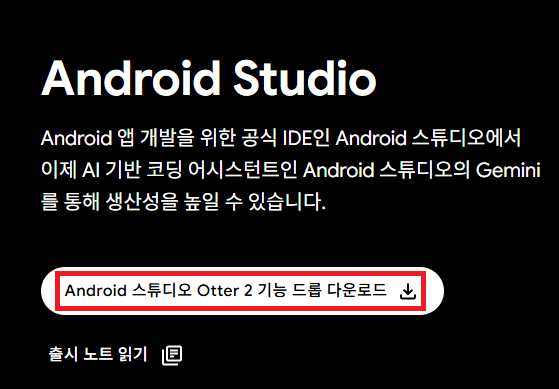
👉 Android 스튜디오 및 앱 도구 다운로드 - Android 개발자 | Android Studio | Android Developers
✅ 해결 (2분 컷)
안드로이드 스튜디오 실행
초기 화면 → More Actions → SDK Manager
상단 탭에서 [SDK Tools] 클릭
Android SDK Command-line Tools (latest) 체크 → Apply
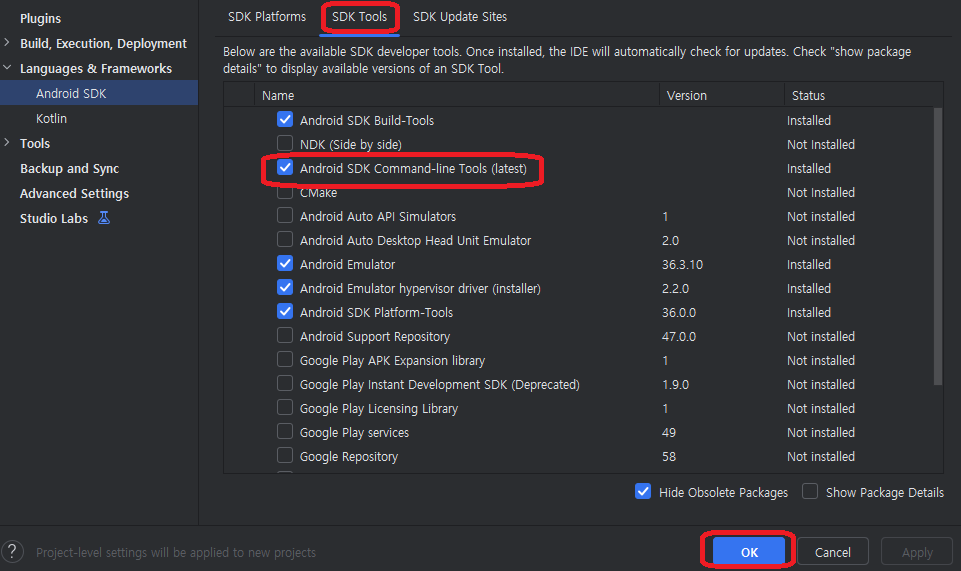
이거 하나 안 깔려서 에러 났던 겁니다. 진짜 허무함.
💡 "[X] Visual Studio" 오류는?
무시하세요.
이건 윈도우 PC 프로그램 만들 때 필요한 건데, 앱 개발할 거면 필요 없습니다. 괜히 깔면 용량만 10GB 날아감.
✨ 중간 결과
Doctor summary (to see all details, run flutter doctor -v):
[!] Flutter (Channel stable, 3.38.4, on Microsoft Windows [Version 10.0.26200.7462], locale ko-KR)
! Warning: `flutter` on your path resolves to C:\Users\lsd33\flutter, which is not inside your current Flutter SDK
checkout at C:\src\flutter. Consider adding C:\src\flutter\bin to the front of your path.
[√] Windows Version (Windows 11 or higher, 25H2, 2009)
[!] Android toolchain - develop for Android devices (Android SDK version 36.1.0)
! Some Android licenses not accepted. To resolve this, run: flutter doctor --android-licenses
[√] Chrome - develop for the web
[X] Visual Studio - develop Windows apps
X Visual Studio not installed; this is necessary to develop Windows apps.
Download at https://visualstudio.microsoft.com/downloads/.
Please install the "Desktop development with C++" workload, including all of its default components
[√] Connected device (3 available)
[√] Network resources
! Doctor found issues in 3 categories.
이제 진짜 시작입니다.
cmd에
flutter doctor --android-licenses
이제 y를 계속 눌러줍니다

C:\Users\[자기경로]>flutter doctor
Doctor summary (to see all details, run flutter doctor -v):
[√] Windows Version (Windows 11 or higher, 25H2, 2009)
[√] Android toolchain - develop for Android devices (Android SDK version 36.1.0)
[√] Chrome - develop for the web
[X] Visual Studio - develop Windows apps
X Visual Studio not installed; this is necessary to develop Windows apps.
Download at https://visualstudio.microsoft.com/downloads/.
Please install the "Desktop development with C++" workload, including all of its default components
[√] Connected device (3 available)
[√] Network resources
저흰 Vs Code쓸꺼니까 이제 성공!!!!!!!!!!!!!!!!!!!!!!!!!!!!!!!!😁😁😁😁
📌 요약 (바쁜 사람용)
오류 해결법
flutter 명령어 인식 안 됨 환경 변수에 flutter\bin 경로 추가 → CMD 재시작
Android toolchain [X] SDK Manager → SDK Tools → Command-line Tools 설치
Visual Studio [X] 무시 (앱 개발엔 불필요)
다음 글에서는 "진짜 앱 하나 만들어보기" 갑니다.
도움 됐으면 공감 눌러주세요. 저도 이거 쓰느라 고생했습니다. 😇
'IT > IT' 카테고리의 다른 글
| 🔥 한투 API 자동매매 봇 만들다 터진 에러 총정리 (Python/pykrx) (0) | 2025.12.12 |
|---|---|
| 움직이는 바탕화면(움직이는 배경화면) 만들기 - Lively Wallpaper (0) | 2021.12.11 |
| 인터넷 속도측정 (0) | 2021.02.09 |
| 그래픽카드 성능순위 알아보기(CPU 성능순위) (0) | 2021.02.08 |
| PDF 파일 변환(PDF 합치기) (0) | 2021.02.07 |


